Query-backed figures, not painted numbers
Open a figure to inspect its calculation. Explore chart data and the records behind it, without asking for another spreadsheet.
Turn your clients’ data into a story that moves. AI-built, in your brand, with numbers they can inspect.
For teams who turn client exports into answers, every reporting period.
Your story. Your signature.
Try another themeLive report. Your choice of theme. Fictional hospital data.The story opens the conversation
Lead your client to the finding. Then give them the room to investigate: compare hospitals, inspect a measure and follow the detail.
Trust, built into the report
The charts and quoted figures stay connected to queries. Definitions make the assumptions visible. You review the report before a client receives it.
Inspect a real reportOpen a figure to inspect its calculation. Explore chart data and the records behind it, without asking for another spreadsheet.
Save a frozen snapshot before sharing. New exports can change your working report; they don’t rewrite an earlier delivery.
Edit manually or with AI. Review the exact report your reader will see. Choose invited recipients, a public link, or an embed.
The conversation keeps moving
From the boardroom to the journey home. Your reader gets the same captions, chart highlights and inspectable numbers on their phone.
This is the live report. Give it a try.
Explore what you could deliver
Walk through the story. Explore the dashboard. Share a single chart. These are real, interactive reports, built from fictional data.
A paced review that brings the numbers, context and next step together.
Compare states, change the period and inspect the measures behind the review.
A standalone map, ready for your website, article or public share link.
An earlier delivery, preserved even after the next export arrives.
A hospital performance story with the context behind growth and clear next steps.
A guided geographic story, ready to publish and embed.
All companies and data in these examples are fictional. Tap a preview to explore it here. Use the report’s fullscreen control for a closer look.
Your next reporting period
The same analysis, your next client, your next period. Keep your definitions consistent and your commentary thoughtful.
Start with CSV files. Prepare the data and define what each measure means, with AI alongside you.
Ask for a report, then make it yours. Charts, captions, highlights and your brand work together.
Preview the real reader experience. Freeze a snapshot. Send a private link, share publicly, or embed it.
Reuse the report for another client. Replace the next export and review what moved before sending again.
From your desk to their inbox
A private home for your clients’ reports. A clear choice over who can open them. Your brand, all the way through.
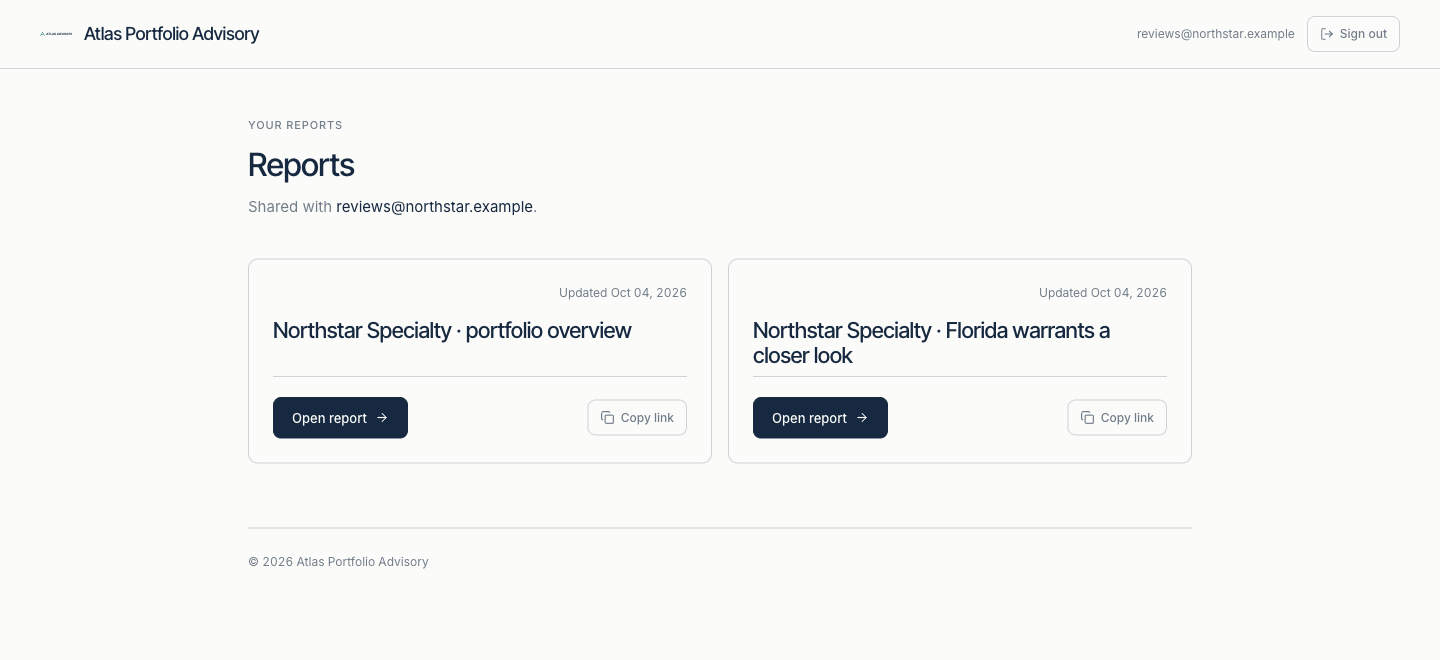
Invited recipients sign in to their branded portal and open the reports shared with them.
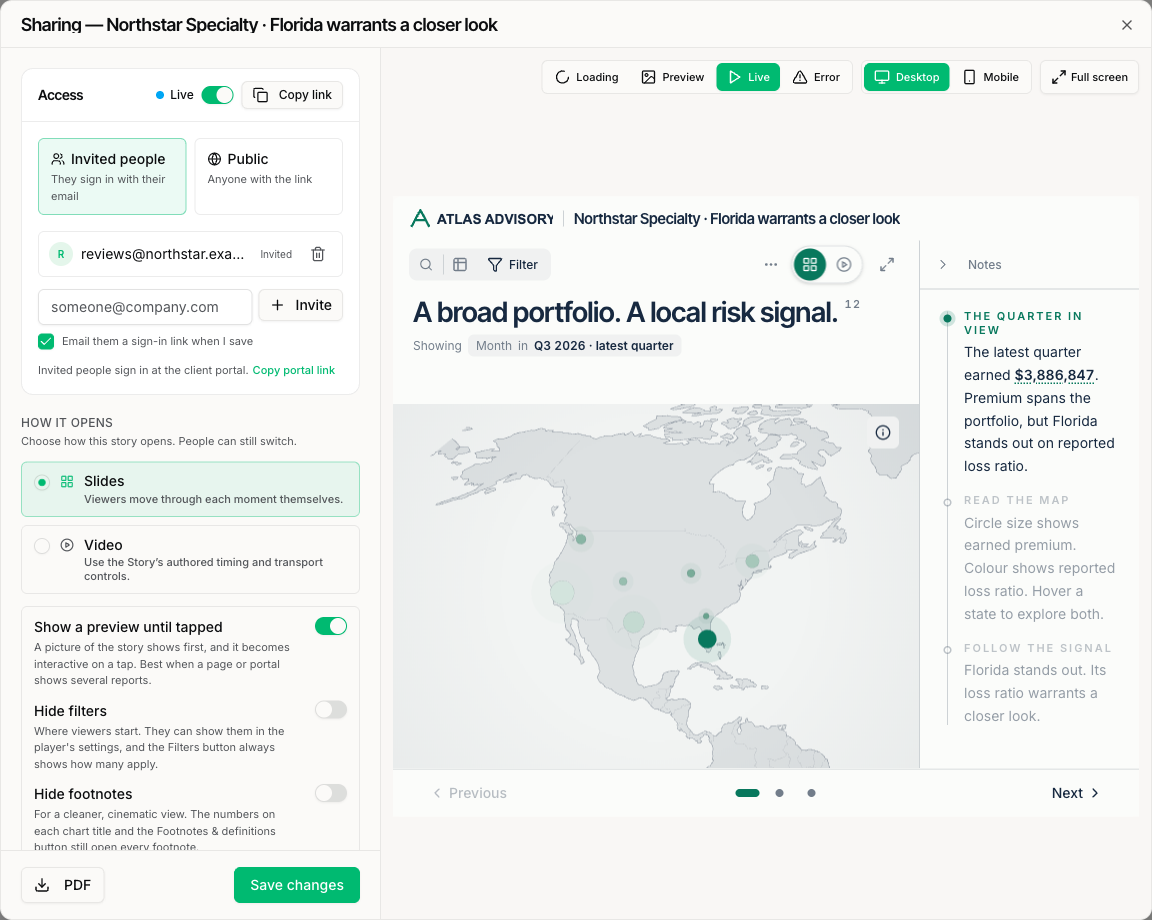
Manage private access, share a public link, or embed the report in your own website.
Actual product screenshots, using fictional demo accounts. No customer data.
Beyond the attachment
A fixed record matters. So does the ability to ask the next question. Vetori pairs a frozen delivery with an interactive reading experience.
| What your reader can do | Static PDF | Vetori report |
|---|---|---|
| See your logo and colours | ✓ Yes | ✓ Yes |
| Keep the version you sent | ✓ Fixed file | ✓ Frozen snapshot |
| Filter a chart to answer a question | Requires another view | ✓ Explore in the report |
| Inspect a number’s calculation | If the author adds it | ✓ Open its definition |
| Read a layout that fits their phone | Usually zoom and pan | ✓ Adapts to the screen |
| Read offline or print | ✓ Yes | ✓ Print / save as PDF |
| Return to a private report library | Needs separate delivery tooling | ✓ Branded client portal |
Comparison is with an ordinary static PDF. PDF features and external delivery tools vary. Live interaction requires an internet connection.
Built for your reporting work
Our first beta focus is recurring insurance reporting. We’re also exploring practice advisory and other firms delivering repeatable client analysis.
Turn portfolio exports into a program review your carrier can explore. Preserve each valuation and explain the movement.
Explore the use caseAlso exploringDeliver a clear performance review for each animal hospital. Consistent definitions, the client’s brand, your advice.
Explore the use caseA similar reporting job?Many clients. Similar exports. A report every period. Tell us what you deliver and we’ll see whether Vetori fits.
Talk about your reportsBefore you join
Vetori works with CSV exports. It does not currently pull from live connectors or refresh on a schedule. The beta is for reporting workflows where exports are already part of the process.
The figures displayed in a report are calculated by queries over its data. AI can help author those queries and the narrative. Inspect the calculations and review the interpretation before sending.
Yes. Themes support your colours and logo. Public reports include a Vetori attribution; private portal reports use your brand without that public attribution.
Yes. Readers can interact with charts and filters while the saved snapshot stays fixed. Your next edit does not change what they received until you share an update.
Request access and tell us what you report on. We’re working with teams to understand their exports, rebuild a representative report and assess fit. Pricing and scope are agreed with each team before any paid work begins.
No. The current beta does not accept personal health information. The practice examples use fictional animal-hospital data. Insurance examples cover non-health portfolios.
Closed beta, built with early teams
Bring your reporting workflow. We’ll explore how to make the output clearer, more compelling, and easier to trust.